Python 包 matplotlib 安装的一些问题
Python 的 matplotlib 在安装的过程中一直无法解决 freetype2 自动下载的问题,导致始终安装不成功。
Python 的 matplotlib 在安装的过程中一直无法解决 freetype2 自动下载的问题,导致始终安装不成功。
怎么通过 GitHub Actions 实时更新 Git 仓库中的子模块(submodules)。
在安装 Y 叔的 yyplot 时候,发现 magick 依赖包安装的时候的一些棘手问题,特此记录一下。
如果你的 R 是使用比较低版本的 GCC(如 Red Hat 6.5 + GCC/G++ 4.4.7),但安装的 R 包需要开启 C++11 支持,或者需要更高版本的 GCC 和 G++,可以参考一下这个方法。
在安装 mamba 的时候在 release 页面和官方的安装页面 总是看到关于 miniforge 和 mambaforge 的选择问题,傻傻搞不明白。
今天终于在阿里云入手了一台 2核(vCPU)+ 2GiB + 3Mbps 的 ECS,安装了最新的 Rocky Linux release 9.3 (Blue Onyx),记录一下开箱后的一些基础配置。
曾经在 《为 Windows 系统替换优雅的苹果字体》中提到可在 Windows 中使用苹方字体替代默认的微软雅黑,这里就有一个问题即需要在 Wondows 下安装苹方字体 —— 如果你的字体安装错误,很有可能导致你的浏览器或其他应用出现乱码。
出现这个的原因主要是站点使用了 PingFang SC 的字体设置。
body {
    font-family: PingFang SC,microsoft yahei,sans-serif;
}
我们可以看到使用 F12 检查源码模式把 font-family 中的 PingFang SC 去掉后即可显示正常。
很多人在使用 Python3 经常会遇到一些 openssl 版本太低从而导致包无法正常使用的问题,尤其是 urllib3 这个包。
Python 3.9.18 (main, Sep  7 2023, 14:32:17)
[GCC 4.8.5 20150623 (Red Hat 4.8.5-44)] on linux
Type "help", "copyright", "credits" or "license" for more information.
>>> import requests
Traceback (most recent call last):
  File "<stdin>", line 1, in <module>
  File "/usr/local/software/python-3.9.18/lib/python3.9/site-packages/requests/__init__.py", line 43, in <module>
    import urllib3
  File "/usr/local/software/python-3.9.18/lib/python3.9/site-packages/urllib3/__init__.py", line 41, in <module>
    raise ImportError(
ImportError: urllib3 v2.0 only supports OpenSSL 1.1.1+, currently the 'ssl' module is compiled with 'OpenSSL 1.0.2k-fips  26 Jan 2017'. See: https://github.com/urllib3/urllib3/issues/2168
>>> import ssl
>>> import urllib3
Traceback (most recent call last):
  File "<stdin>", line 1, in <module>
  File "/usr/local/software/python-3.9.18/lib/python3.9/site-packages/urllib3/__init__.py", line 41, in <module>
    raise ImportError(
ImportError: urllib3 v2.0 only supports OpenSSL 1.1.1+, currently the 'ssl' module is compiled with 'OpenSSL 1.0.2k-fips  26 Jan 2017'. See: https://github.com/urllib3/urllib3/issues/2168
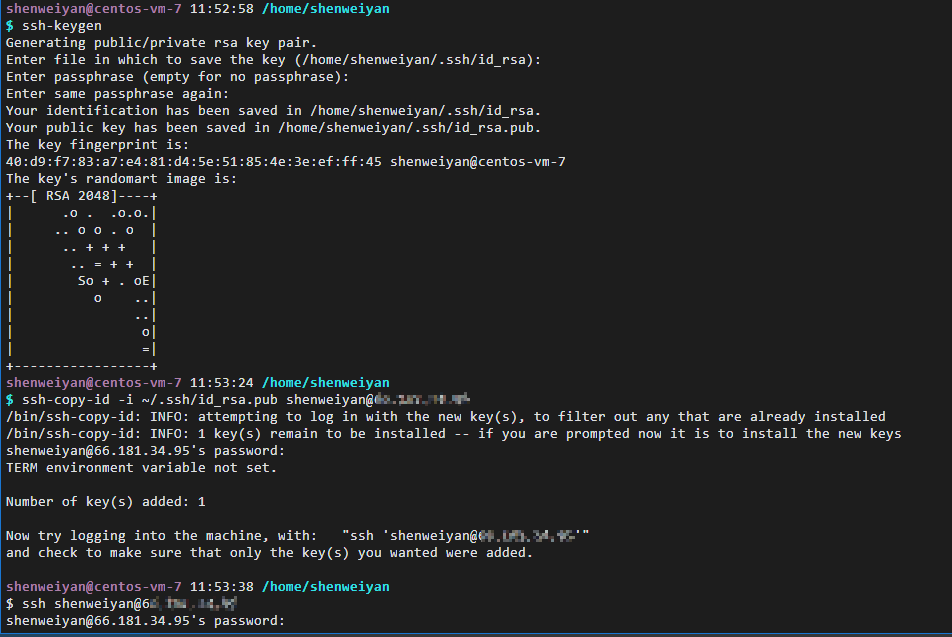
今天从服务器 A(CentOS 7.3)配置 SSH 无密码登录服务器 B(CentOS Steam 9),发现执行以下常规操作后无法实现:
$ ssh-keygen
$ ssh-copy-id -i ~/.ssh/id_rsa.pub shenweiyan@66.xx.xx.xx  # ssh-copy-id user@rhel-9-server-IP
$ ssh shenweiyan@66.xx.xx.xx
记录一下 Micromamba/Mamba 安装的步骤和注意事项。
Mamba 可以使用 Mambaforge 方法和已有 Mini/conda 的方式安装,官方推荐的是前面一种,即使用 Mambaforge 进行全新安装。
关于 mamba 的安装,官方推荐 Fresh install,即全新安装。
We recommend that you start with the Mambaforge distribution. Mambaforge comes with the popular conda-forge channel preconfigured, but you can modify the configuration to use any channel you like. Note that Anaconda channels are generally incompatible with conda-forge, so you should not mix them.
我们建议您从 Mambaforge 发行版开始。 Mambaforge 预配置了流行的 conda-forge 通道,但您可以修改配置以使用您喜欢的任何通道。请注意,Anaconda 通道通常与 conda-forge 不兼容,因此您不应混合使用它们。